Appearance
Browser Script
Introduction
QualiBooth Browser Script is a JavaScript library designed to monitor and evaluate web accessibility compliance using the axe-core scanning engine. The script is embedded on websites to automatically detect accessibility issues, generate compliance scores, and provide detailed reports that help organizations improve their digital accessibility.
The script operates with minimal performance impact and is designed to respect user privacy while providing valuable accessibility insights. This documentation provides a comprehensive overview of how the Browser Script works, what data it collects, and how it processes that data to generate accessibility scores.
How Browser Script Works
Architecture Overview
The Browser Script is a modular JavaScript application that runs directly in the user's browser. It consists of several key components:
- Main Module: The entry point that initializes the script and determines the operational mode.
- Scan Module: Responsible for running accessibility checks using axe-core.
- Network Module: Handles communication with the backend services.
- DOM Observer Service: Monitors page changes to trigger new scans when appropriate.
- Report Serializer: Processes and formats scan results before transmission.
- Development Assistant: Optional component that provides visual feedback and debugging tools.
The script is designed to be lightweight and non-intrusive, with careful attention to performance optimization to ensure minimal impact on page load times and user experience.
Integration Process
To integrate the Browser Script into a website, a site administrator needs to:
- Register for a QualiBooth account and obtain a project ID.
- Add the script tag to their website's HTML:
<script id="qualiboothScript" src="https://cdn.portal-backend.prod.qualibooth.com/script/{PROJECT_ID}/assets/qualibooth.js" defer type="module"></script>The script automatically initializes when the page loads and begins monitoring for accessibility issues based on the configured settings.
Operational Modes
The Browser Script supports two primary operational modes:
- Auto Mode (Default): The script automatically scans pages for accessibility issues when they load.
- Development Assistant Mode: Activated by adding the
qda_debugparameter to the URL or when the development assistant is explicitly enabled. This mode provides an interactive interface for developers to identify and fix accessibility issues in real-time.
Update Mechanism
The Browser Script includes a self-update mechanism to ensure that the latest version is always running without requiring manual intervention:
- When an update is available, the script automatically replaces itself with the new version.
- The update process is designed to be seamless and does not disrupt the user experience.
Data Collection and Processing
Data Collected and Sent to Backend
The Browser Script collects the following data and transmits it to the QualiBooth backend:
- Page Information:
- URL
- Device type (desktop or mobile, based on screen width)
- Project ID (derived from the script URL)
- Accessibility Scan Results:
- Violations detected by axe-core (rule ID, impact level, number of affected nodes)
- Accessibility score calculated based on the violations
- Script version number
The data is transmitted securely using HTTPS and is associated with the project ID, not with individual users.
Data Processing Flow
- When a page loads, the script checks if a scan should be performed based on the sampling configuration.
- If a scan is to be performed, the script first sends a page view notification to the backend.
- The backend responds with a confirmation whether to proceed with the scan.
- If confirmed, the script runs an accessibility check using axe-core.
- The scan results are processed by the Report Serializer to remove unnecessary details and reduce payload size.
- The processed results and calculated score are sent to the backend for storage and analysis.
Data Retention Policy
QualiBooth retains the collected data for the duration specified in the service agreement. The data is used to:
- Generate accessibility reports and dashboards
- Track accessibility improvements over time
- Identify common accessibility issues across the website
- Provide recommendations for accessibility improvements
Privacy and Security
User Data Protection
The Browser Script is designed with privacy as a core principle:
- All data transmission is encrypted using HTTPS.
- No personally identifiable information (PII) is collected or transmitted.
- IP addresses are not stored with the accessibility data.
- The script does not use cookies or local storage for tracking purposes.
Data Not Collected
The Browser Script explicitly does NOT collect or store the following types of data:
User Personal Information:
- Names, email addresses, or contact information
- User account details or credentials
- Social security numbers, credit card information, or financial data
- Health information or other sensitive personal data
User Behavior Data:
- Keystrokes or input field values
- Mouse movements or click patterns
- Browsing history beyond the current page
- Session recordings or screen captures
Device Information:
- Precise geolocation data
- Device identifiers (beyond simple desktop/mobile classification)
- Operating system details
- Browser fingerprints
Content Data:
- Full DOM content (only accessibility-relevant attributes are analyzed)
- Images or media content
- User-generated content
- Proprietary business data displayed on the page
Compliance with Privacy Regulations
The Browser Script is designed to comply with major privacy regulations including:
GDPR (General Data Protection Regulation):
- No personal data is processed without consent
- Data minimization principles are applied
- Data is only used for the specified purpose of accessibility analysis
CCPA (California Consumer Privacy Act):
- No sale of personal information
- No collection of identifiers that could be linked to consumers
HIPAA (Health Insurance Portability and Accountability Act):
- No collection or processing of protected health information
Accessibility Scoring System
The Accessibility Scoring System is designed to quantify how well individual pages and entire sites meet accessibility requirements. It operates at two levels: page-level scoring and site-level scoring.
Page-Level Scoring
Scoring Methodology
The page accessibility score is calculated based on the violations detected by the axe-core scan.
The score represents the percentage of accessibility requirements that are met, with 100 being a perfect score (no violations).
The scoring system takes into account:
- The severity (impact) of each violation
- The number of elements affected by each violation
- The total number of elements that were tested
Severity Levels and Weights
Violations are categorized into four severity levels, each with an assigned weight:
| Severity Level | Weight | Description |
|---|---|---|
| Critical | 4.0 | Issues that completely prevent users with disabilities from using the feature |
| High | 1.0 | Issues that create significant barriers for users with disabilities |
| Medium | 0.1 | Issues that create moderate barriers for users with disabilities |
| Low | 0.0 | Issues that create minor inconveniences for users with disabilities |
These weights are used in the score calculation to give more importance to critical issues.
Score Calculation Formula
The accessibility score is calculated using the following formula: 
Where:
- TotalWeightedViolations: Sum of (violation severity weight × number of affected nodes) for all violations
- TotalAccessibleElementsWeight: Sum of (severity weight × number of nodes) for all tested elements (both passing and failing)
If there are no violations, the score is automatically 100.
The final score is rounded to one decimal place.
Site-Level Scoring
Scoring Methodology
The site accessibility score aggregates the scores of individual scanned pages while considering page traffic (number of visits).
This ensures that frequently visited pages have a greater influence on the overall site score than rarely visited ones.
In other words:
- A page with high traffic and low accessibility will reduce the site score significantly.
- A page with low traffic and low accessibility will have a smaller impact.
- Perfectly accessible pages improve the overall score proportionally to their traffic.
Weighted Contribution
Each page contributes to the site score based on both its score and its number of visits: 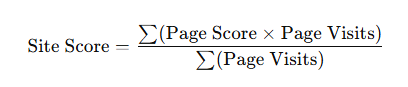
Where:
- Page Score = accessibility score of the page (from page-level scoring)
- Page Visits = number of times the page was visited in the measurement period
Example
- Page A → Score: 50, Visits: 10
- Page B → Score: 90, Visits: 5
Site Score = ((50 × 10) + (90 × 5)) / (10 + 5)
Site Score = (500 + 450) / 15 = 63.3
In this case, Page A’s low score strongly drags down the site score because it is visited more frequently.
Technical Specifications
Browser Compatibility
The Browser Script is compatible with all modern browsers, including:
- Google Chrome
- Mozilla Firefox
- Apple Safari
- Microsoft Edge
- Opera
Internet Explorer is not supported.
Performance Impact
The Browser Script is designed to have minimal impact on page performance:
- The script is loaded with the
deferattribute to ensure it doesn't block page rendering. - Scans are performed asynchronously and do not interfere with user interactions.
- The script uses sampling to reduce the number of scans performed on high-traffic pages.
- The total script size is approximately 30KB gzipped.
- CPU usage during scanning is typically less than 5% on modern devices.
Network Requirements
The Browser Script requires network connectivity to function properly:
- Outbound HTTPS connections to:
cdn.portal-backend.prod.qualibooth.com(script loading)page-metrics.prod.qualibooth.com(scan sampling)
- Typical data usage:
- Initial script load: ~2KB
- Page view notification: ~1KB
- Scan results transmission: ~5–20KB (depending on the number of violations)
Development Assistant
Features and Capabilities
The Development Assistant is a tool designed to help developers identify and fix accessibility issues in real-time. It provides:
- Visual Highlighting: Identifies elements with accessibility issues directly on the page.
- Issue Details: Provides detailed information about each issue, including:
- Description of the problem
- Affected elements
- Suggested fixes
- References to relevant WCAG guidelines
- Filtering Options: Allows filtering issues by severity.
Usage Guidelines
To activate the Development Assistant:
- Add the
qda_debug=trueparameter to the URL of any page where the Browser Script is installed. - Alternatively, set
localStorage.setItem('qualibooth_dev_assistant', 'true')in the browser console. The Development Assistant will appear as a panel on the left side of the page. It can be collapsed using the "Collapse" button.
Key Advantages and Known Limitations
Overview
The Browser Script is one of QualiBooth’s most powerful accessibility monitoring capabilities.
Once installed on a client’s website, it automatically scans every page a user visits—continuously, without requiring any configuration or manual effort.
This unique approach ensures full visibility into real user journeys, including authenticated and dynamically generated content that traditional crawlers or server-side scanners cannot reach.
Key Advantages
Comprehensive Real-World Coverage
The Browser Script captures every page visited by real users, including dynamically loaded or authenticated areas (e.g., checkout flows, dashboards, or custom experiences).
Unlike crawlers, which rely on predefined sitemaps or limited crawling logic, our script ensures no URL that gets visited is missed, reflecting true user exposure.Zero Configuration & Continuous Monitoring
Once added to the site, everything happens automatically.
There is no need for ongoing setup, scheduling, or technical intervention. QualiBooth continuously collects accessibility data and monitors changes in real time.User-Impact Prioritization
Because we track visit frequency, issues can be prioritized based on how many users are affected.
For instance, a critical issue on a page visited 100 times per day receives proportionally higher priority than one on a rarely visited page.
This allows teams to focus on what truly matters — impact on real users.Visibility Into Authenticated and Personalized Environments
The Browser Script works seamlessly behind authentication walls, within personalized dashboards, and across pages that depend on logged-in user states.
These environments are often inaccessible to automated crawlers or background scanners, making this feature essential for holistic site coverage.Automatic Daily Scanning
Pages are rescanned automatically up to three times per day and per device, ensuring ongoing visibility into evolving issues.
This helps teams detect regressions or newly introduced accessibility problems promptly.Data Enrichment and Aggregation
Scans collected through real visits are aggregated for all types of browsers, devices, and geographies.
This provides a statistically rich and realistic picture of how accessibility performs in the wild.
Known Limitations
Despite its many strengths, the Browser Script also has practical boundaries, most of which are natural trade-offs of its design.
However, these limitations are well-understood, mitigated through complementary tools (e.g., Agora or the Server-Side Scanner), and do not outweigh its overall value.
- Performance Impact — On very large pages (5,000+ DOM nodes), scans can momentarily affect page smoothness.
- Unpredictable Scan Timing — Although the scan waits for the DOM to be "ready", the scan may still run before all lazy-loaded or hidden content (such as modals or below-the-fold items) is available. As a result, parts of the page may never get scanned.
- Inconsistent Results & Scores — Due to dynamic content, different visits may yield slightly different outcomes. Some hidden or lazy content could be scanned during one visit and not scanned during another. A page may score well even though part of it (lazy-loaded content, modals, or hidden interactions) is not scanned.
- False Positives from Local Factors — Browser extensions or personal settings may cause localized issues that do not reflect the actual page state.
- Limited Issue Traceability — CSS selectors are not recorded.
- Geo-specific Variations — Regional content may produce region-specific violations, which are hard to find.
Conclusion
The Browser Script remains a cornerstone technology within the QualiBooth ecosystem.
Its ability to monitor real user experiences, detect accessibility regressions in live contexts, and automate continuous scanning makes it invaluable, especially when combined with our other services.
While it has certain technical constraints, these are well-known and actively mitigated. In practice, the Browser Script provides unmatched visibility and scale, delivering ongoing accessibility intelligence that traditional scanning approaches simply cannot achieve.
Frequently Asked Questions
Q: Does the Browser Script slow down my website?
A: The Browser Script is designed to have minimal impact on page performance. It loads asynchronously, runs in the background, and uses sampling to reduce the number of scans on high-traffic pages.
Q: Is user data safe with the Browser Script?
A: Yes. The Browser Script does not collect any personally identifiable information (PII) or sensitive user data. It only collects information related to accessibility issues on the page.
Q: How accurate is the accessibility score?
A: The accessibility score is based on the axe-core engine, which is widely recognized as one of the most accurate automated accessibility testing tools. However, automated testing can only identify about 50–60% of all accessibility issues. Manual testing is still recommended for comprehensive accessibility evaluation.
Q: Can the Browser Script fix accessibility issues automatically?
A: No, the Browser Script only identifies issues and provides recommendations. Fixing the issues requires manual intervention by developers.
Q: How often should I check my accessibility score?
A: We recommend monitoring your accessibility score continuously, especially after major website updates or content changes.
Q: Is the Browser Script compliant with GDPR and other privacy regulations?
A: Yes, the Browser Script is designed to be compliant with major privacy regulations including GDPR, CCPA, and HIPAA. It does not collect personal data and follows data minimization principles.
Appendix
Glossary
- Accessibility: The practice of making websites usable by as many people as possible, including those with disabilities.
- ARIA (Accessible Rich Internet Applications): A set of attributes that define ways to make web content and applications more accessible to people with disabilities.
- axe-core: An open-source accessibility testing engine used by the Browser Script.
- DOM (Document Object Model): A programming interface for web documents that represents the page structure.
- WCAG (Web Content Accessibility Guidelines): A set of recommendations for making web content more accessible.